
Best Wrist Rest for Ergonomic Support
In short
It's important to protect your hands, wrists, and forearms from stress and strain.
Call (817) 382-6789 to have this looked at, or book online with Dr. Knight.
Many Americans are tied to their desks during the day. Some professionals spend as many as 10 hours a day sitting at a computer. If this sounds like you, it’s important to protect your hands, wrists, and forearms from stress and strain. Here’s what you need to know about wrist rests for a more comfortable workday.
Why Proper Wrist Support Matters for Your Health and Productivity
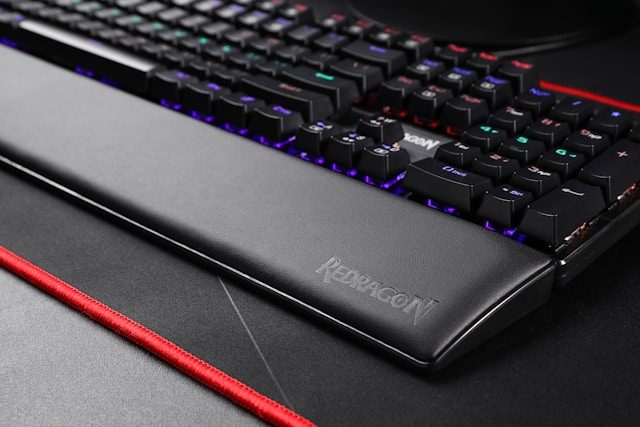
Image by Rebekah Yip is licensed with Unsplash License
In the United States, over 30 million workers have sedentary jobs, many of which involve long hours at a desk. Technology and telecommunications workers spend over 82% of their workweek typing. Employees in scientific fields, information services, data processing, finance, and insurance all spend over 70% of their workweek typing.
Proper posture and support are essential when you’re dedicated to using a computer and mouse for long periods each day. Leaning on your wrists or placing your wrists on the hard edge of the desk can cause contact stress. Over time, this continued pressure on the underside of the wrist may lead to repetitive strain injuries like carpal tunnel syndrome and tenosynovitis.
Choosing the Perfect Wrist Rest
Your wrist rest should be part of an ergonomic office setup. This includes:
- A chair that allows your feet to rest flat on the floor
- Armrests that keep your elbows close to your body and your shoulders relaxed
- A keyboard positioned directly in line with your wrists and forearms, so your hands sit just below your elbows
- A monitor that’s 20 to 40 inches from your face, directly in your line of sight
Throughout the day, you should be able to sit with your shoulders relaxed, back straight, and lumbar area supported. Keep your feet flat on the floor and sit so your knees and hips are level.
Your wrist rest should support proper alignment and posture, not compensate for a bad setup. A good wrist rest is about 1.5 inches deep, soft, and rounded. The goal is to eliminate hard surfaces and sharp corners, while keeping your hands and forearms comfortably elevated as you use the mouse or keyboard.
Top 10 Best Wrist Rests for Ergonomic Support in 2025
If you’re not sure where to start, these products have all earned high ratings from professionals seeking the best desk supports.
- DeltaHub Carpio 2.0This small gliding wrist rest is ideal for those who need free movement with their mouse.
- Gimars Upgrade EnlargeMemory foam filling and a superfine silky cover make this keyboard and mouse set a top pick.
- HandStands Beaded Keyboard & Mouse Wrist Rest ComboBeaded filling provides adjustability, and the poly-cotton cover is machine washable.
- Logitech WaveThis ergonomic keyboard positions the keys in a wave pattern for easier manipulation, with a wrist rest built in.
- GORILLA GRIP Silky Memory FoamAvailable at a low price, this keyboard and wrist set is soft and supportive.
- Razer BlackWidow V3This gaming keyboard features mechanical keys for tactile feedback and includes a built-in wrist rest.
- HyperX Wrist RestIf you’re working in a warm office, this is a prime pick thanks to the cooling gel in the memory foam wrist rest.
- DeltaHub Carpio G2.0This wearable wrist rest straps onto the hand and features cutouts for airflow.
- Reloot Glider v2This gliding wrist rest improves wrist extension and moves with you as you manipulate your mouse.
- Microsoft Sculpt Ergonomic KeyboardThis distinctive keyboard design splits the keys into sections for each hand, with a wrist rest attached for comfortable typing.
Proper Wrist Rest Usage: Maximizing Benefits and Avoiding Mistakes
The term “wrist rest” is somewhat deceiving. You shouldn’t rest your wrists heavily on anything when typing. The hands should be elevated slightly above the wrist rest as you manipulate the keys. When you pause, you can gently lay your hand on the wrist rest, but only the palm or heel of your hand should make contact with the rest. The wrist itself should remain elevated to avoid pressure on this part of the body.
A mouse wrist rest shouldn’t inhibit fluid movement of the wrist and mouse. A gliding mouse rest works well if you move your mouse around a lot. If you have a stationary mouse or make only minimal movements with the device, a stable wrist rest for the mouse may work. It’s important to avoid any awkward bending or straining of the wrist as a result of a poorly placed or inefficient wrist rest. The rest should always support an inline position, so your wrist doesn’t bend up or down from your forearm.
Maintenance and Care Tips for Longevity
Your wrist rest is a high-touch surface that has a lot of contact with your hands. It’s best to keep your wrist rest clean and sanitized. Most products can be wiped down with a slightly damp cloth. An antibacterial wipe can help tackle germs. Immediately dry the wrist rest after cleaning to avoid water damage.
If the surface of your wrist rest starts to tear, degrade, or disintegrate, it’s time for a new one. As with any frequently used item, these products can start to break down after years of use.
Alternative Ergonomic Solutions to Consider
A flat keyboard may not require a wrist rest. The higher your keyboard, the more important this added support becomes. A desk mat or soft mouse pad may be sufficient to boost comfort as your hand rests on the desk between tasks. Taking frequent breaks will help reduce body strain as well. Perform wrist stretches and rolls every 30 minutes to keep your joints supple. Try to stand up and engage in other activities for at least five to 10 minutes every hour.
Talk With Dr. Knight Today
If you’re suffering from tenderness, stiffness, or swelling in your wrist, you may need more than a wrist rest. Contact Dr. Knight at The Hand and Wrist Institute for an expert diagnosis and personalized guidance on how to maintain healthy, comfortable wrists while you work.